


Question.AI - Chatbot&Math AI
4.612.88K Reviews
App Specs
- Version
- 3.5.6
- Updated On
- License
- Free
- Downloads
- 10,000,000+
- Developer
- D3 DIMENSION TECHNOLOGY PTE.LTD.
- Categories
- Education
- Platform
- Android, iOS
Screenshots

 Analysis by AppCompare
I reach for Question.AI when I want to turn a question or a difficult-looking exercise into something I can work through, rather than just stare at. It sits in the education category, but its appeal is broader than homework: I can use a conversational assistant to clarify a concept, check my understanding, or get a starting point for further reading. The useful question is not whether an AI can answer quickly, but whether its answer helps me do something better afterward.
What the free price does—and doesn’t—tell you
The app is free to install, and it offers in-app purchases ranging from $0.49 to $99.99 per item. That makes it easy to try before deciding whether it belongs in your routine. The range is wide, though, so I would not assume that every feature or level of use is included at no cost; check the purchase details shown in the app before committing. Its free entry point is a genuine convenience, while the potential paid spend is worth considering if you expect to use it often.
For context, Question.AI has a 4.7 average from around 229,000 ratings, and it has passed 10 million installs. Those figures suggest that many people have tried it, but they don’t tell me whether it fits my needs. I’d judge its value by a simpler test: does it help me understand or finish a task, and does the way I use it justify any purchase I choose to make?
Where the assistant earns its place
The strongest case for the app is having several kinds of help in one place. A typed question can lead into a follow-up conversation, while a math exercise can become a chance to inspect the reasoning instead of copying an answer. That combination is handy when I’m studying alone and don’t have a teacher or classmate nearby to explain a confusing step.
There’s also a useful difference between getting an answer and learning from one. I’d ask it to explain why a step works, then try a similar problem without looking. If I can’t reproduce the reasoning, the response hasn’t finished the job for me. Treating the assistant as a study partner rather than an answer key is a more rewarding way to use it, and it keeps me involved in the learning.
Where I’d be cautious
A fast, confident-sounding reply can still be wrong or incomplete. I wouldn’t use an AI chatbot as the final authority for a graded solution, an important factual claim, or a decision with real consequences. For schoolwork, I check the explanation against class notes or a trusted textbook, especially when a small mistake in a formula or assumption could change the result.
There is a broader learning trade-off, too. If I paste every exercise in and accept the first answer, I may finish sooner while understanding less. I get more out of the app when I provide the exact question, ask for the reasoning, and then verify the key step myself. A conventional calculator is faster for routine arithmetic; a textbook or teacher is a better fit when I need a carefully structured lesson or dependable feedback on my own work.
Worth Reading Before You Choose

EA SPORTS FC Mobile 26 Is a Bigger Football Game, but It Takes Time

Flipboard Shows What News Apps Must Do Beyond the Feed

Switching to Android Auto Means Rethinking Your Driving Routine

Google Calendar Makes a Crowded Week Easier to Manage

Ludo King Makes the Most of the Minutes Between Plans

Baby Panda World Brings Quick Play to Modern Phones, but Its Game Library Feels Busy
Who is likely to find it useful?
I can see it suiting students who want another way to unpack a topic, adult learners refreshing their math, and curious users who like asking follow-up questions. It can also help when a question comes up at an inconvenient moment and I want a plain-language explanation before deciding what to read next. The app is rated for Everyone, but that age label is not a substitute for a parent’s judgement about how a child should use AI or check its answers.
I’d skip it if I mainly need a reliable calculator, a formal course with a fixed syllabus, or answers that never need checking. It may also be a poor match for someone who finds chat-based explanations distracting or prefers learning from a book, a teacher, or a specialist tool built around one subject. The best fit is someone willing to question the response and use it as support, not as a replacement for their own work.
What Exactly is Question.AI?
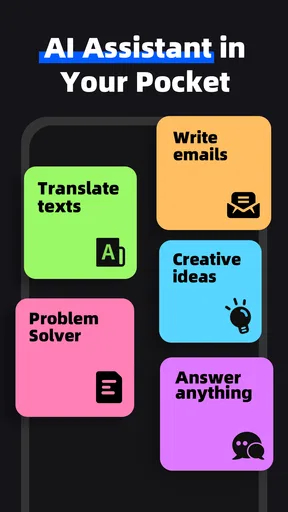
First off, let’s talk about what Question.AI actually does. Imagine having a smart assistant in your pocket, ready to tackle your toughest questions and math problems. It’s designed to be your go-to digital buddy for everything from quick trivia to complicated algebra. Whether you’re a student, a curious mind, or just someone who likes to have a clever AI to chat with, this app has something to offer.
Getting Started with the App
Downloading and setting up the app was a breeze. Available on both Android and iOS, you can easily find it on the app store. Once installed, you’re met with a clean, user-friendly interface. No clutter, just straight to the point. I appreciate that, especially in an app that’s meant to simplify life, not complicate it.
As soon as you launch it, the app greets you with a friendly chatbot interface. You can type in your queries or math problems, and it responds in real-time. The app also supports voice input, which is super handy when you’re on the move.
The Chatbot Experience
I spent quite a bit of time just chatting with the AI, throwing random questions its way. The responses were impressively accurate and quick. It doesn’t just spew out generic answers; it tries to provide context and depth, which I found quite engaging. You know, it kind of feels like chatting with a knowledgeable friend who's always in the mood for a discussion.
But the real kicker? You can dive into more serious topics, and it doesn’t shy away from complexity. Whether it’s historical facts, scientific concepts, or the latest in tech news, the chatbot handles it like a pro.
Math AI to the Rescue
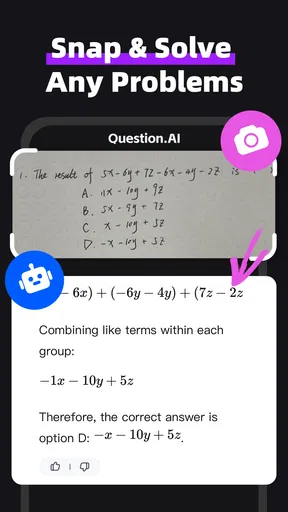
Now, onto the math part. This feature is a lifesaver for students or anyone who deals with numbers regularly. From simple arithmetic to more advanced calculus problems, the app breaks down solutions step-by-step. It’s almost like having a private tutor available 24/7.
What’s cool is that it doesn’t just give you the answer—it helps you understand the process. This is super beneficial if you’re trying to learn and not just get quick solutions. I tested it with a range of math problems, and the accuracy was spot-on.
Becoming a Power User
For those looking to get the most out of Question.AI, there are some neat features to explore. You can customize the chatbot’s personality to suit your style, which adds a fun element to your interactions. Plus, there’s a history section where you can revisit past queries and responses—helpful if you need to double-check something or just want to see how far you’ve come in your learning journey.
The app also allows you to save specific questions or problems. This is particularly useful for students who might want to review certain topics before a test or exam. It’s like having a personalized study guide built right into the app.
Final Thoughts
Overall, Question.AI - Chatbot&Math AI is a fantastic tool for anyone who likes having instant information at their fingertips. It’s engaging, informative, and genuinely helpful. Whether you’re looking to learn, solve problems, or just have a chat, this app covers all bases.
The app is made by D3 DIMENSION TECHNOLOGY PTE.LTD., and its current version is 3.3.32. It was released on May 29, 2023, and requires Android 7.0 or later. I’d still check that the version available on my device is current before relying on it for a study session, since app interfaces and options can change over time.
A practical way to use it during a study session
Imagine I’m revising after dinner and get stuck on a word problem. Instead of asking only for the final number, I’d enter the full problem and ask the assistant to identify what is known, what needs to be found, and which operation connects them. Then I’d work through the calculation myself and compare my steps with the explanation. If the answer differs, I can point to the exact line that confused me and ask a focused follow-up. That small change turns a quick lookup into a useful check on my reasoning.
For non-math subjects, I’d use the same approach: ask for a plain-language explanation, then request an example or a contrast with a related idea. Before saving a response, I’d make sure it’s phrased in a way I can understand later, rather than keeping a polished paragraph I cannot explain in my own words. The history and saved-question tools are most useful when I treat them as a record of things to revisit, not as proof that I’ve mastered them.
Small habits that improve the answers
Specific prompts make a real difference. I include the level of detail I need, name the part of a problem that is confusing, and ask for one step at a time when a long explanation feels overwhelming. For math, copying the expression carefully matters: a misplaced sign or bracket can send an otherwise sensible solution in the wrong direction. I also avoid sharing personal or sensitive details in a question; an educational prompt rarely needs them.
Voice input is handy when typing is awkward, but for equations and symbols I prefer to inspect the text before relying on the result. Speaking a question naturally can save effort, yet mathematical notation is easy to express ambiguously. If the wording could have more than one meaning, I restate it plainly and ask the assistant to confirm what it is solving before I follow the steps.
How it compares with familiar study tools
Compared with a standard search engine, a chatbot can feel more convenient when I want to ask a follow-up without rebuilding the search from scratch. Search remains better when I need to compare sources, see where a claim came from, or find an official reference. I use the conversational answer as a starting explanation, then look elsewhere when the source itself matters.
Compared with a calculator, the advantage is explanation rather than speed. A calculator is the cleaner choice for checking arithmetic, while a tutor or course can give a planned sequence of lessons and notice patterns in a learner’s mistakes. Question.AI fits between those options: useful for an immediate explanation or a second pass at a question, but not a substitute for a structured curriculum or human feedback.
Choosing whether to keep it
My recommendation is to try it for a real task rather than judging it by casual questions alone. Use it on one exercise you genuinely want to understand, follow the reasoning, and check the result independently. If that process saves time while leaving you better able to solve a similar problem, the free access may be enough to make it worthwhile. If you start considering an in-app purchase, decide first which part of your routine it would improve and confirm the purchase terms in the app.
If you’re keen to give it a whirl, you can grab it from the app store. Trust me, once you start using it, you’ll wonder how you ever managed without it. So, go ahead, dive in, and let me know what you think!
Pros
- Intuitive interface for easy navigation.
- Accurate math problem solutions.
- Variety of chatbot personalities.
- Quick response time in chats.
- Supports multiple languages.
Cons
- Limited offline functionality.
- Occasional parsing errors.
- Requires stable internet connection.
- Premium features behind a paywall.
- Ads in the free version.
FAQs for Question.AI - Chatbot&Math AI
What is Question.AI - Chatbot&Math AI used for?
Question.AI - Chatbot&Math AI is designed to serve as both a chatbot and a math assistant. It provides users with the ability to interact through natural language processing while also offering mathematical solutions and explanations. This dual functionality makes it a versatile tool for both social interaction and academic support.
Is Question.AI - Chatbot&Math AI suitable for all age groups?
Yes, Question.AI - Chatbot&Math AI is designed to be user-friendly and accessible to all age groups. However, younger users may need guidance to fully utilize its mathematical capabilities. The app offers a simple interface but contains advanced features that can cater to more mature users as well.
Does Question.AI - Chatbot&Math AI require an internet connection?
Yes, an internet connection is required for optimal functionality. The app relies on cloud-based AI to provide accurate responses and solutions. While some basic features may work offline, most of the app's capabilities, including updates and advanced interactions, need internet access.
Are there any subscription fees for using Question.AI - Chatbot&Math AI?
Question.AI - Chatbot&Math AI offers both free and premium versions. The free version provides basic functionalities, while the premium version unlocks advanced features, such as extended math problem solving and priority chatbot responses. Subscription fees vary, and users can choose based on their needs.
How does Question.AI - Chatbot&Math AI handle user privacy?
User privacy is a top priority for Question.AI - Chatbot&Math AI. The app employs strong encryption and data protection protocols to safeguard user information. Personal data is not stored on the app's servers, ensuring that conversations and queries remain confidential and secure.


